

AI in testing: from manual checks to a smart workflow

My name is Dzianis Talstsiuk. I am a QA Engineer at EXANTE, an international brokerage platform for trading on global financial markets. I am responsible for the desktop trading terminal, the web terminal and the mobile applications.
This article covers how I built AI into our testing processes, using it as a working partner alongside a tester. The assistant speeds up testing, broadens test coverage and, ultimately, helps us get features to release faster.
We work in the financial domain, where the bar for quality is high. A price rendered incorrectly in the order book (the list of current buy and sell orders), or an order stuck in an unresolved state, can lead to client losses and regulatory risk. That is why our processes require early analysis of specifications, formal acceptance criteria and regression coverage for every significant piece of functionality.
Requirements analysis takes time and requires close attention to detail. During the development cycle, it is easy to spend more time on it than the schedule allows. AI can take care of routine tasks, leaving the tester to focus on the analysis and make the final decisions.
We will go in order:
- First, the tools and the stack.
- Then, how the testing process changed at each stage, from requirements analysis to automated tests.
- Next, where AI helps and where it falls short.
- Finally, a look at the technical setup behind it.
Tools
Two layers come together here: the stack we use to test our trading terminals and the AI tools that sit on top of it.
Project stack
• Python and pytest for automated tests.
• Web terminal: Playwright.
• Desktop application: OpenCV, EasyOCR and PyAutoGUI.
• AI tools: solutions from Anthropic and OpenAI.
Getting started is straightforward: install an extension and log in. But this article discusses something different: an approach where AI is built into the process. That means putting clear control points between requirements analysis, development, testing and release.
The QA entry point in a classic process
At EXANTE we aim to follow a shift-left approach. In practice that means involving the tester before a task reaches development, so they can review the specification, validate acceptance criteria and find gaps in the requirements at the earliest stage. It is easy to see the benefit: the earlier a defect is found, the cheaper it is to fix.
Within a sprint it is rarely possible to set aside enough time for a deep review of the specification. So shift-left can end up looking good on paper but turning into reactive testing in practice.
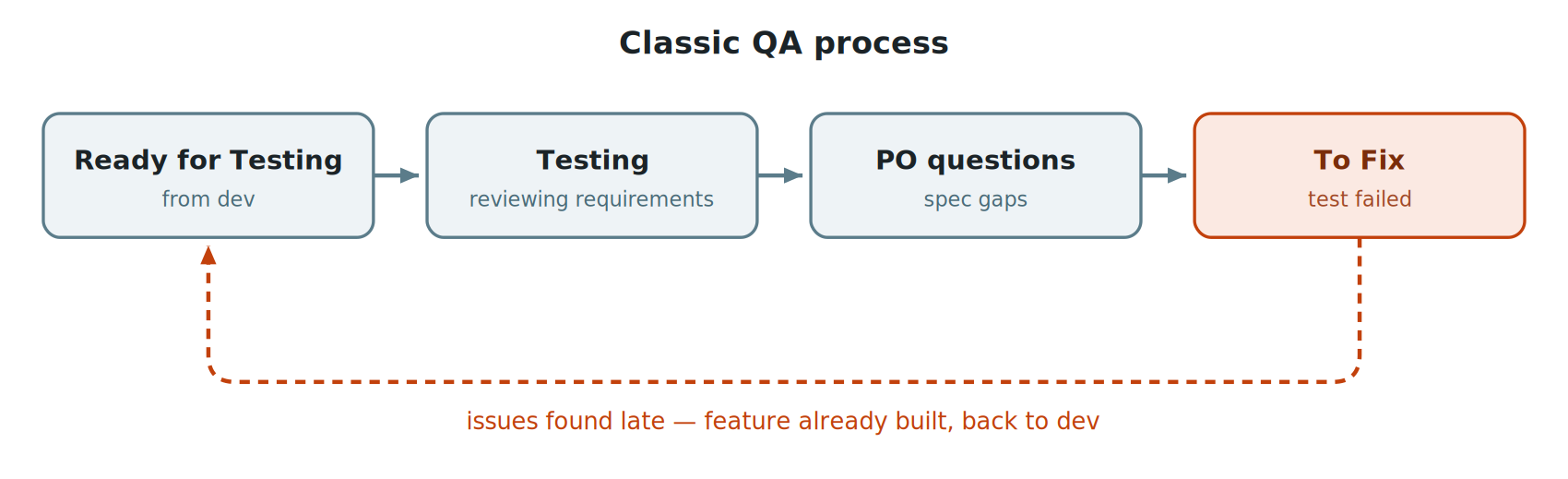
Classic flow: gaps surface after implementation and the feature goes back to development
The later a gap in the requirements is found, the more expensive it is to fix. It means more rework, more time spent and a slower delivery.
Consider an example. We need to add a focus function to a module so that the selected instrument is pinned at the top of the list. All the main scenarios are described: display, refresh, sorting. But one case is missing: what happens to the pinned block on the search screen? If the user searches for one ticker while another instrument is in focus, the first result they see is an instrument they were not looking for.
An LLM can catch a gap like this during requirements analysis, before the task reaches the Ready for Testing column and turns into a bug.
That is the idea behind the new approach. The tester gets more time to analyse and test requirements, a stage that a traditional process leaves little time for. AI acts as a partner, taking care of routine work and speeding up delivery. The time saved can then go into exploratory testing or even fixing bugs. Yes, the tester as bug fixer. That probably deserves an article of its own.
How we test requirements with an LLM
Instead of waiting for a task to arrive in Ready for Testing, QA joins as soon as the Product Owner has fixed the requirements. In practice the tester:
• Runs the requirements through the LLM: Checks how complete, unambiguous and consistent they are and whether they contain logical gaps or unhandled edge cases.
• Adds the missing context: Alongside the model’s general knowledge, we give it some internal context: our guides on requirements testing, feedback from previous tasks and a Model Context Protocol (MCP) connection to our internal documentation. Technically, this is a context layer on top of the model rather than fine-tuning. I will explain how it works in more detail in the sections on the knowledge base and the pipeline.
I pay particular attention to acceptance criteria. They become the source of truth for the developer and for QA, so any ambiguity can create problems for everyone.
AI is good at spotting things a tired human eye might miss, such as wording that looks fine at first but can be interpreted in more than one way.
Consider a second example. We need to add a column to the instrument list module with an icon showing each instrument’s price chart. You read the task and a swarm of questions immediately comes to mind, some of them familiar from previous projects. An LLM helps look at the task with fresh eyes and turn those questions into something more structured:
• Data source: which data source feeds the chart: mid, the average of bid and ask, or trade, the actual transactions in the instrument?
• Price type: when the backend returns chart data, are those prices adjusted for splits, dividends, issuance and spin-offs, or raw?
• Loading status: what appears in the icon for an instrument just added to the list: an empty cell, a placeholder or a loading indicator?
• Error handling: what do we render in the icon cell when data fails to load for that specific instrument, while others in the same table load successfully?
• API load: if chart icons are on by default for every instrument in the module and the limit is 100, does that put unnecessary load on the backend? And do we need deferred or lazy loading for visible rows only?
If any of these questions come up later, they can mean longer delivery times, higher development costs and extra rounds of design and coding. Answering them during the requirements stage costs a fraction of that.
What we focus on during analysis
We have turned the questions that come up again and again into a standard checklist. The model gets it with every significant task.
The main areas we look at are:
• Consistency of sources. Do Jira, Confluence and the technical specification say the same thing, and are there mutually exclusive statements inside them?
• Completeness of logic and dependencies. Are all branches of behaviour described, and how does the feature interact with adjacent modules?
• Regression risk. Which existing behaviour do we touch, and which features depend on what we are changing?
• Edge cases. Empty state, large numbers of items, network failure and interrupted session.
• Sync between clients. Should module profiles and user settings match on desktop, web and mobile?
• Explicit out of scope. What we deliberately leave out of the task. We record this in writing, otherwise it appears as a surprise at acceptance.
• Consistency with design. Is there an up-to-date mock-up, and does the requirement text match it?
AI does not give you finished answers here. Instead, it helps you get to the right questions faster and clarify the details. A person still makes the final call, but the time it takes to go from receiving a task to fully understanding it is much shorter.
Checklists for developers
The analysis produces a checklist for the developer, which goes into the task description and covers all the necessary checks. The developer works through it before handing the feature over to QA.
What it contains:
• The main business scenario.
• Edge cases.
• Consistency with the design and visual consistency.
• Extended checks and scenarios specific to the feature.
The team signs off the test plan before development starts, and only then does the developer pick up the task.
From there, the work runs in parallel. The developer writes the code and unit tests and works through the checklist, while QA creates manual test cases and links them to the Jira task. This means the test cases are ready by the time the developer hands the feature over.
The developer sends the task to testing only when every checklist item has passed without errors. Obvious bugs are therefore caught before the ticket reaches QA.
A fair question is: why keep test cases if the developer already has a checklist? The checklist is a one-off set of checks for a specific feature before it goes to testing. Test cases serve a longer-term purpose. They support regression testing, systematic coverage and onboarding for new team members.
How we generate test cases
We write test cases from the clarified requirements and the agreed test plan. What used to take several hours now takes a fraction of that. AI helps us to:
• Create structured cases.
• Cover edge cases.
• Keep a single format across cases.
With an integration into a system such as Qase, much of the process can be automated: from the requirements text to a finished set of test cases in the right format, linked to the Jira task.
It is important to remember: AI-generated test cases still need to be reviewed. The model handles standard scenarios well, but can struggle with specific domain rules unless the relevant documentation is part of its context. Good prompts and a well-prepared knowledge base can help address that.
Automation
This is where the manual stage ends and automation takes over.
Our UI automation stack:
• Python and pytest.
• Page Object Model (POM) as the architectural basis.
• Image recognition and optical character recognition (OCR) to find elements. In our setup the usual approach with DOM locators does not work.
• PyAutoGUI to emulate user actions at coordinate level.
We write API or end-to-end (E2E) tests for every significant feature. They are developed alongside manual testing and move automatically into the regression suite when the task is closed. Because we write them in the same sprint, regression coverage grows with the product instead of becoming technical debt.
Where AI genuinely helps
A few scenarios where I use Claude Code every day:
• Generating a test skeleton from an existing POM. The model understands the project structure well and writes a new test in the style of the existing ones, with the right fixtures, Allure steps and calls to the relevant page objects. That saves a lot of time on routine work.
• Refactoring repeated code. If five tests share the same data preparation block, the model spots it and suggests moving it into a fixture or a base class method.
• Finding debugging patterns. When a test fails and the stack trace is not obvious, the model often suggests where to look, even when the cause sits in the specifics of our framework.
• Writing supporting utilities. Helpers for image handling, parsers for OCR output, helpers for drag and drop between widgets. Work that used to take half a day now takes half an hour, review included.
Where AI does not help
Claude Code does not solve everything, and there are several classes of error I have been caught by.
1. Silent failures, the most treacherous class.
The agent does not fail with an error and it does not say that it could not work something out. Instead, it confidently returns an answer that looks correct but is based on incomplete data.
Here is an example. A ticket required the requirements to be collected for analysis and test design. The agent opened the first link in the description, found an empty page and concluded that there were no additional requirements. Technically, that was correct: the link led nowhere. But the description also contained a second link to the current specification. The agent had no way to tell whether the data was missing or whether it simply could not access it. From its perspective, both looked the same.
So “no requirements found” is not really an answer. It is a signal to check the sources yourself and update the prompt accordingly.
2. Tasks where working it out yourself is faster than explaining the context.
When you look at a requirement, you are holding a lot in your head at once: the mock-up, how neighbouring modules behave, decisions made in the past and implementation details. Someone who knows the project can often see how a new feature will fit into the existing product, and where problems might arise, much faster than they can explain all of that in a prompt. Some dependencies are not documented anywhere. They live in the code or in the team’s heads, and the model does not know they exist. It can then give a confident answer based on an incomplete picture, which you have to correct afterwards.
My practical rule is simple:
- If the context is already written down somewhere, whether in documentation, mock-ups or a knowledge base, and I can attach it to the prompt, the task is worth giving to the model.
- If the dependencies exist only in the code and in the team’s heads, I ask myself whether explaining all that context will take longer than doing the task myself.
If it will, I do it myself. But if I need the same context a second time, that is a good reason to write it down as a knowledge-base file. From the next task onwards, the balance starts to shift towards the model.
Specific places in automation where Claude Code lets me down regularly.
• OCR and image template matching. When an element is not recognised by the standard template, for example because the UI truncates it and OCR sees clipped text, the generated matching logic treats a partial match as a success. A check such as “the expected string is contained in the recognised one” can pass on a fragment. The test goes green even though nothing meaningful has been verified. This needs to be fixed by hand.
• Drag and drop between widgets. Dynamically calculating drop-zone coordinates in a desktop application is tricky. Standard approaches do not work, yet the model keeps suggesting the “correct” API solution that we simply do not have.
• Complex page objects with nested logic. When a page is more than a collection of buttons and combines several widgets, each with its own state, the model can generate code that works but is poor from an architectural point of view. It needs a human review before it can be used.
• Negative assertions. Checks such as “the element did not appear” or “the binding did not happen” often come out as anti-patterns. They can behave unreliably or slow down the whole test run. These usually need to be rewritten by hand.
How my setup is organised: knowledge base, commands, pipeline
So far, we’ve looked at the process. Now for the practical side: how I get useful answers from the model when working on our tasks. A few changes to how I approach it have made a noticeable difference to the quality of the answers and saved time.
Knowledge base: index and linked files
Claude Code has two files that are automatically added to the context of every session: CLAUDE.md and MEMORY.md. Claude Code loads their contents at the start of each dialogue without being asked. They look like ordinary Markdown files, but they serve different purposes.
• CLAUDE.md has no hard line limit, but its contents are loaded into the system prompt at the start of every session. The longer the file, the more tokens it uses and the more it can dilute the model’s attention. In practice, keeping it to around 100–150 lines is sensible.
• MEMORY.md is more restrictive. Only the beginning of the file is included in the automatic context, and longer files are truncated. We therefore keep it short and use it as an index rather than a store. It contains only the essentials: the project stack, key rules and links to separate files, with a short note explaining when each file should be read. Everything else lives outside the automatic context and is loaded only when a task requires it.
An important detail: Claude Code does not automatically read files mentioned in the index. It needs an explicit trigger, such as: “if you are working on a task of type X, open file Y first”.
How the linked files are organised
Once you have more than a dozen files you need a taxonomy, otherwise nobody remembers where anything is six months later. Five categories emerged:
• Processes. The stages of work: requirements analysis, writing a test plan and handling specific types of tasks. They answer the question: how do we do it?
• Integrations. Reference material for external systems such as the issue tracker, test management system (TMS) and design tools. They answer the question: how do we access them and what do we take from them?
• Formats. The structure of output artefacts: which fields belong in a test case, bug report or test plan and how they should be delivered. They answer the question: what should it look like?
• Methodology. The techniques used to create those artefacts: requirements analysis, test case design, writing acceptance criteria and bug analysis. This is not a description of our internal practice, but a reference to established industry methods that our processes rely on. It answers the question: which technique should we use?
• Feedback. A separate and probably the most valuable category. These are corrective rules built up over time. When the model gets something wrong, we add a one-line correction to the feedback file so the same mistake does not happen again. It is a simple idea, but one that can have a big effect: you write the correction once and it keeps working from then on.
Three layers of automation: slash commands, subagents, MCP
Next comes the tooling. Claude Code has three separate mechanisms that are easy to confuse. They all look like Markdown files, but each serves a different purpose.
• Slash commands are essentially macros for prompts. You type /qa-analyze, and a long, prepared prompt containing all the necessary instructions is added to the chat. Nothing runs in isolation, so everything stays within the same context. That saves keystrokes and makes the process more consistent. The same request gets the same instructions every time, making the results easier to compare across runs and between team members.
• Subagents are separate workers with their own clean context. When the main Claude delegates a task to a subagent, an isolated session starts with its own system prompt and memory. The subagent does the dirty work: reading five files, comparing them and working through the details. It returns a final answer of a couple of hundred tokens and disappears. The main chat stays clean. In practice, it is like a function call with its own scope.
• An MCP server is an external source of tools and knowledge that Claude talks to over the protocol. It runs as a separate process and provides tools for things like accessing the issue tracker, writing a test case to the TMS or calling an API. It is available everywhere: in the main chat, in subagents and across other projects.
Three layers are needed instead of one because each solves a different problem:
• A slash command optimises input. It saves typing and standardises prompts.
• A subagent optimises context. It takes heavy work into isolation so the main chat stays clear.
• MCP optimises reuse. The same integration is available everywhere instead of being copied into every command.
A headless mode for routine work
In addition to the three layers listed above, there's a fourth: CLI scripts based on the claude -p "..." command. This works well for small morning tasks, such as checking the current status of the board or preparing context for the stand-up. We wrap these in small bash scripts. One command in the terminal, and the summary is on screen before the stand-up starts.
How it works together
In the morning, the tester runs a slash command such as /qa-task-pipeline [task number]. The command expands into a long prompt with instructions. From there, the main Claude orchestrates the task:
• Calling the MCP: the system requests and receives the full task context from the tracker.
• Delegating analysis: the subagent reads the requirements-analysis methodology from its own session, applies it and returns a list of gaps.
• Generating tests: next, the main Claude passes the clarified requirements to the test-case-writer subagent. It reads the case format and generates the test cases.
• Results: finally, it goes back to MCP and writes the cases into the TMS.
The result is three artefacts at once: a list of questions for the Product Owner, a checklist for the developer and test cases with links.
Council team: a council of agents
A separate part of the flow is the council command. I use it on every task to raise the quality of requirements analysis, test design and automated test code review.
Instead of relying on a single pass, the council brings together several independent agents with different roles. Each looks at the requirement, test cases or code from a different angle and their conclusions are then combined. They all work from the same knowledge base described above, including methodology templates, feedback rules and internal documentation accessed through MCP. Looking at the same problem from different angles reveals more gaps, edge cases and weaknesses in the tests. It gives us another opportunity to catch defects before they reach the later stages, where they are more expensive to fix.
It is important to remember: the pipeline produces a draft, not a finished result. QA reviews the generated checks and uses their experience, product knowledge and the requirements themselves to fill any gaps in the checklist and test cases. In my experience, the process does not work without that review.
A simple rule for choosing between them:
- Slash command: a short operation in a single context.
- Subagent: a heavier task with its own context that would clutter the main chat.
- MCP: when the task needs to reach the outside world, such as APIs, databases or external services.
Conclusions
Getting value from AI depends on knowing how to use it. In practice, four things make the biggest difference:
• Personal productivity rises through automating parts of the process. Routine work that used to take hours now takes minutes.
• Test coverage improves. More thorough coverage means fewer bugs to fix later and fewer repeat runs.
• Analysis becomes more detailed. Earlier contact with the Product Owner helps features get better thought through before development and testing. AI improves this stage by bringing questions to the surface that might otherwise appear only during testing.
• Expertise grows across the team. This applies to both manual testing and automation. Reviewing generated artefacts is useful training in itself. When you pick apart the model’s cases and code, you start to recognise good structure faster. And when you explain the product to the model, you inevitably organise your own knowledge of it more clearly.
It is worth remembering one thing: AI is a co-worker, not an author. The goal is to reinforce expertise, not replace it. Building AI into working processes is a natural step in the industry’s development. The tools can strengthen a team, but they do not remove the need for people who understand the product and can judge the quality of the result.
Practical tips for implementing AI in QA
If you want to introduce AI into your own team, here are some practical lessons from my experience:
- Start with one entry point. Requirements analysis with an LLM is the easiest place to begin. Try it on three to five tasks and see which questions for the product owners start coming up earlier. It takes little effort and produces visible results quickly.
- Review of AI-generated test documentation. Plans, cases and checklists should always pass through human review before they are used. The model is good at assembling routine checks, but human expertise is still needed when scenarios depend on neighbouring modules or domain-specific details. Without review, the process can become a formality: AI generates something, the developer works through the list and nobody really trusts the result. During the rollout, review also shows where the context given to the model needs improvement.
- Start a feedback file on day one. Every time the model gets something wrong, write the rule down in one sentence. After a couple of months, you will have a set of rules tailored to your project.
- Keep MEMORY.md as an index, not a store. Do not try to squeeze everything you know about the project into it. Keep the critical information there and use links to separate documentation for everything else, with a note explaining when each file should be consulted.
- Slash commands first, then subagents, then MCP. Start with slash commands, then add subagents and MCP. Do not try to build the whole pipeline at once. Slash commands deliver much of the benefit with relatively little effort. They also provide the foundation for the more advanced layers.
- Measure with simple metrics. How many questions for the product owners moved to the requirements stage? How many bugs did we find inside the current task compared with outside it? Has the time from Ready for Testing to Done changed? Without numbers during the pilot phase, it will be hard to explain to the team why to continue.
In conclusion: AI can speed up testing and requirements analysis and broaden test coverage. But it does not remove the need for human judgement. The real difference is in how the team uses it. That is what determines whether AI actually improves product quality and delivery speed.
Do you agree — or do you already see tasks that AI can fully take over from QA? Let us know in a comment.
本文提供給您僅供資訊參考之用,不應被視為認購或銷售此處提及任何投資或相關服務的優惠招攬或遊說。金融商品交易涉及重大損失風險,可能不適合所有投資者。過往績效不代表未來表現。





由專業人士建立。為專業人士打造。
