

CRM, Regulatory Constraints, and Automation: How We Engineered a Reliable Release Process

How 60+ modules, 7 production environments, and auditor requirements pushed us toward a unified delivery process and what came out of it.
Hi! My name is Evgeny, and I’m a DevOps engineer at EXANTE. In this article, I’ll share how we moved from manual Saturday releases through Jenkins to a unified automated delivery process that now runs across 30+ services.
I’ll walk through the problems that pushed us to change, how we incorporated auditor requirements, and what ultimately changed in the team’s day-to-day work.
What Is Exante CRM
We have a CRM system — exante-crm. Almost everything depends on it: client operations, document management, compliance, and integrations. If the CRM goes down, part of the business stops. When the CRM updates, everyone knows — because everyone gets nervous.
The scale in numbers:
- 60+ Django apps in a single repository — from client onboarding to HR and BI integrations
- 3 PostgreSQL databases — main CRM, back-office data, and search index
- 6 Celery queues + Redis — emails, audit logs, exports, synchronisation, live data
- 10+ white-label brands — each with its own domain, configuration, and locale
- 15+ external integrations — KYC providers, banking services, marketing, analytics
- 7 production environments — different jurisdictions, separate Kubernetes clusters (GKE), plus stage and load-testing
- Related components — after deploying the main CRM, we must also update crm-script (background jobs) to keep versions aligned
Architecturally, it’s a monorepo with clearly separated modules. The product evolved over the years; the combination of “many modules + many environments + related services” made manual releases especially painful.
Each release isn’t just “code going to production” — it’s potentially an auditor’s question: who deployed it, and why.
A quick note for those who haven’t dealt with fintech audits before. EXANTE is a licensed broker operating across multiple jurisdictions. Regulators (and the auditors they appoint) periodically review how the company manages changes in production systems: who initiated the change, who approved it, what checks were performed, and whether a rollback is possible.
All of this falls under change management, and for us it’s not just a formality — it’s a regulatory requirement. Failing to meet it can put the company’s license at risk. Throughout the article, when I mention “audits” and “auditors,” this is what I’m referring to.
In this article, I’ll share how we moved our releases from a manual and fragile process to one that’s predictable and auditable. No magic involved — we simply documented everything step by step and embedded it into the pipeline. The same approach now runs across 30+ services, not just the CRM.
How It Used to Be
Previously, the process looked like this: a developer created a tag, filled in a Jira ticket (hoping not to forget anything), and on Saturday, a release engineer deployed everything via Jenkins. Code and pipelines lived in GitLab, but deployment happened in Jenkins. GitOps mostly existed in name only.
What Wasn’t Working:
- Manual ticket creation — Every time, dozens of Jira fields had to be filled in. Fill it in, double-check it, and discover half the fields are wrong. Sometimes tickets were forgotten entirely. Later, an auditor would ask, “Where’s the ticket for this deployment?” — and you’d think, “Good question.”
- Hard-coded release windows — Deployments were tied to specific calendar days (“it’s safer”). Result: accumulating diffs, stressful Fridays, elephant-sized releases.
- Deployment knowledge lived in people’s heads — The correct order of steps, environment nuances, configs — undocumented. A new engineer needed months before being trusted with a release.
- No clear visibility — To understand what version ran in a specific environment, you had to check the cluster or ask in chat: “What’s in prod?” Chat as a source of truth — yes, that was real.
- Manual post-deploy checks — After deployment, an engineer manually opened key pages and clicked through forms. If core pages responded, good enough. Zero automation.
Why We Decided to Change
We could live with the old process, and we did. Releases worked. Over time, “inconvenient” turned into “risky.”
Auditors started asking questions we couldn’t answer quickly
EXANTE is a licensed broker. As the company grew and expanded into new jurisdictions, regulatory oversight became stricter. External auditors are specialists engaged either by the regulator or by the company itself to prepare for inspections. Their job is to ensure that changes in production systems are controlled: there is a responsible person, an approval, and a record of what happened.
They began asking regularly: who deployed version X to environment Y, when it happened, why it was done, and who approved it. With a manual process, finding the answer often turned into an investigation:
- The Jira ticket exists, but it’s filled out poorly.
- The deployment log exists, but you need to know where to look.
- The person who clicked the button remembers — but that colleague happens to be on vacation.
More than once, we ended up spending hours reconstructing something that should have been recorded automatically.
Scale outgrew the manual process
Manual deployment is manageable with two environments. With seven, each with its own cluster, variables, and Jira component, the process starts falling apart. On the third, you forget to update the ticket, on the fourth, you mix up the version, on the fifth, you forget to update crm-script.
It’s not negligence. It’s the limit of human attention during repetitive tasks.
Meanwhile, services kept growing. CRM wasn’t the only one. Dozens of projects, each deployed differently — no unified process, hard to onboard new engineers, and improvements had to be replicated dozens of times.
Engineers were tired of routine
People who knew how to deploy spent hours filling tickets, running scripts, checking if deployment succeeded, and posting Slack updates. Not engineering — just repetitive work at the expense of tasks that actually required thinking.
Fixes waited for “windows,” not users
Deployments were scheduled. A bug was found on Monday? Fix goes out next window. Hotfixes formally existed, but the number of approvals and manual steps discouraged their use unless the system was on fire.
Code accumulated between releases, each deployment became huge, and isolating issues became harder.
Related components drifted apart
The CRM is the main application (API and web interface). Alongside it runs crm-script — essentially the same CRM codebase, but executed as Celery workers: background tasks such as notifications, data synchronization, exports, and queue processing.
Because crm-script uses the same data models and codebase as the main application, their versions must always match. If the main CRM is updated but crm-script remains on an older version, background tasks start operating on outdated models — and within hours the jobs begin to fail.
With manual deployments, crm-script was often forgotten during updates. The resulting mismatch with the API usually surfaced only later, when it was already too late
What We Changed — and How It Works Now
We moved step by step.
The first iteration was implemented on a non-critical service. It included a minimal set of features: creating a change ticket in Jira via API, committing the new tag to the Flux repository, and sending a Slack notification. Once we saw that this basic integration worked, we moved forward.
Next, we added automatic status transitions in Jira (Implementing → Released / Rolled back), post-deployment verification (checking pods, health endpoints, and logs), and Slack threads instead of separate messages. We rolled this out across more than five projects, gathered feedback, and fixed several edge cases — commit conflicts in Flux, Jira API timeouts, and Slack rate limits.
Only after that did we connect the CRM — one of our most complex and critical systems — once we were confident the template could handle the load.
Our idea was simple: at the moment of deployment, a person performs one manual action — pressing the deploy button for the target environment. Everything else is handled by the pipeline.
At the same time, “one click” refers specifically to the moment of release. Code review, MR approvals, access controls, and release windows (where applicable) remain part of the process and happen before deployment. We automated the routine of rolling out changes — not the control around it.
Process release scheme:

Let’s walk through what happens, step by step.
First, a developer creates a Git tag — that’s what triggers the pipeline. From there, automation takes over: building the image, running linters and tests, scanning dependencies. If something breaks, the process stops — nothing moves forward.
In GitLab, each environment has its own deploy button. The developer selects the target environment, clicks the button, and can either go grab a coffee or watch the logs (whatever fits their mood).
Then automation takes control. A child pipeline starts with a chain of stages:
- Prepare — creates a Jira ticket via Service Desk API (or skips if not in CMDB), opens a Slack thread.
- Deploy — commits to the Flux repo (updates image tag), moves Jira ticket to “Implementing.”
- Verify — waits for rollout, then runs checks (details below).
- Finish — on success: Jira → “Released,” Slack updated. On failure: “Rolled back” + notifications.
- Post-release — updates related components (e.g., crm-script) to keep versions aligned.
Let’s look at a key configuration snippet as an example. In simplified form, connecting to the shared template looks like this:
# .gitlab-ci.yml
stages:
- lint and test
- build
- deploy
- verify
include:
- project: 'ops/devops/cicd'
ref: '$CI_DEFAULT_BRANCH'
file: 'base-templates/jira-change/multi-env-projects.yml'
The template reference is pinned (tag or commit), so updates don’t break releases unexpectedly. The team upgrades when ready.
One include line and the project gets full deployment automation, provided environments and parameters exist in the central registry and permissions are configured.
What Our Deployment Template Includes
In this article, I mostly talk about the CRM, but the deployment template itself is shared. It’s used by 30+ services — backends, frontends, and utilities. The CRM wasn’t the first to adopt it, but it became the real stress test, proving that the template can handle truly heavy scenarios.
What we standardised and what’s worth not overlooking if you’re building something similar:
- One trigger: tag → button → automatic flow. Different deployment approaches for different projects are a guaranteed path to chaos.
- Automatic change ticket creation. Under regulatory requirements, tickets must be created by the system. People forget fields, mix up components, and skip environments.
- One deployment = one Slack thread. Otherwise, the channel turns into noise, and reconstructing the deployment history becomes impossible.
- GitOps commits in a unified format: the commit message includes the ticket reference and the environment. This is exactly what an auditor looks at in Git.
- Post-deploy verification using a single, standardised set of checks for everyone. Otherwise, you verify one service but forget another — we’ve tested this the hard way.
- A unified status model: Created → Implementing → Verifying → Released / Rolled back. An auditor filters by status and immediately sees what happened where.
- Post-release hooks for related components (like our crm-script) — updates must be automatic only. “Don’t forget to update this as well…” Done manually is a consistent source of bugs.
- Retry logic for parallel deployments. Two services commit to the same Flux repository — conflict. Without retrying with backoff, it would break constantly.
- Environment configuration in a single registry: Jira keys, clusters, namespaces, health paths. A new environment or service requires only a couple of lines in YAML.
- We don’t swallow errors at any stage. Notifications are always sent, and the ticket receives the correct status. For us, a “silent” failure is worse than an explicit one.
One detail about scale is worth mentioning. With two or three projects, using a shared template is simply convenient. With thirty-plus, it becomes essential: without it, you can’t guarantee consistent compliance, you can’t onboard a new engineer in an hour, and you can’t fix the process in one place instead of thirty.
We realized this once the number of projects started to grow.
Verify: What It Is and What It Is NOT
Verify is an automated pipeline stage that answers a simple question: “The deployment finished — is the application alive?”
It’s not a separate service or an external tool. It’s a GitLab CI job that runs after Flux has applied the changes to the cluster.
It checks:
- HelmRelease is Ready
- Deployment rollout completed
- Pods are Running/Ready
- Image tag matches expected
- No abnormal container restarts
- Service endpoints available
- Internal health check
- External health check (via ingress)
- Fresh logs analysed for critical errors
If all checks pass, Verify records DEPLOY_RESULT=SUCCESS, and the pipeline moves to the Released stage. If even one critical check fails, the result is FAILURE, and the pipeline transitions to Rolled back.
What Verify doesn’t do.Verify catches deployment and availability issues: crashed pods, a stuck rollout, a failing health check, the wrong image. It’s the minimum safety check.
What it doesn’t replace is functional testing. Business logic, forms, integrations — those are covered by the next layer: automated smoke tests.
Auto-Smoke Tests: Already in Progress
Verify catches issues at the level of “the application failed to start.” But there’s a whole class of problems that can slip through: broken authentication, an unavailable integration, an error in a critical form. The application is “alive,” but not truly healthy.
Auto-smoke tests are a natural extension of the current Verify stage. If Verify answers the question “Is the application alive?”, smoke tests answer “Is the application actually working?”.
That’s exactly why we’re already implementing automated smoke tests.
- When they run: after deployment and a successful Verify. This becomes the third validation layer:Build → Verify → Smoke
- What they check: core critical scenarios — availability of key pages, ability to authenticate, correctness of responses from main API endpoints.
- What they provide: a reduction in manual post-deploy checks. Instead of “I’ll click around and test it manually,” we get an automated report that shows what’s broken immediately.
- Audit trail: smoke test results are stored as pipeline artefacts and linked to the Jira ticket. An auditor can see not only “deployment succeeded,” but also “core scenarios were verified.”
What About Rollback?
Flux CD already supports auto-rollback. If HelmRelease doesn’t reach Ready, it reverts to the previous revision and emits an alert.
In stricter regulatory environments, rollback requires confirmation. For us, that’s a feature — sometimes “automatic rollback” is worse than “rolled back in five minutes, consciously.”
Git Flow + GitOps, Done Properly
In textbooks, GitOps looks elegant: everything in Git, declarative, automatic.
In reality, especially with multiple jurisdictions and auditors, “pure” GitOps doesn’t survive without adjustments.
From GitOps, we take what actually proved useful:
- Git as the source of truth — the state of every environment is described in the Flux repository. What’s in Git is what runs in the cluster.
- Declarative changes — modifications happen via commits to a single repository, not kubectl patch or manual helm upgrade.
- Auditability — a complete history: who, when, which tag, and with which Jira ticket.
And we integrate regulatory realities:
- Manual trigger — deployment does not happen automatically on commit. It requires a conscious action (clicking the button), which is recorded as the release decision.
- Change ticket — every deployment generates a ticket with full context: version, environment, who initiated it, and status transitions.
- Approval gates — code review and MR approvals happen before the tag is created, as part of the project’s main workflow.
- Environment separation — each production environment has its own button, ticket, and verification. There is no “deploy to all at once.”
The result is GitOps in essence, but adapted to our specifics. We’re not “breaking” GitOps — we’re adjusting it to regulatory and control requirements.
How Git Flow Helps
In the end, our customised version of Git Flow gives us:
- A clear release point — a tag on a specific commit. Not “something like the latest master,” but a concrete, immutable version.
- Decision history — merge commits, PR reviews, approvals; everything is preserved in Git history.
- Cherry-pick/hotfix capability — when you need to urgently fix one environment without impacting the others.
Git Flow, by itself, does not ensure compliance. You need additional controls: branch protection, mandatory reviews, signed commits when required, and a clear linkage between Git artefacts and change tickets.
Audit Artefacts
When auditors request a quarter’s change history, we show:
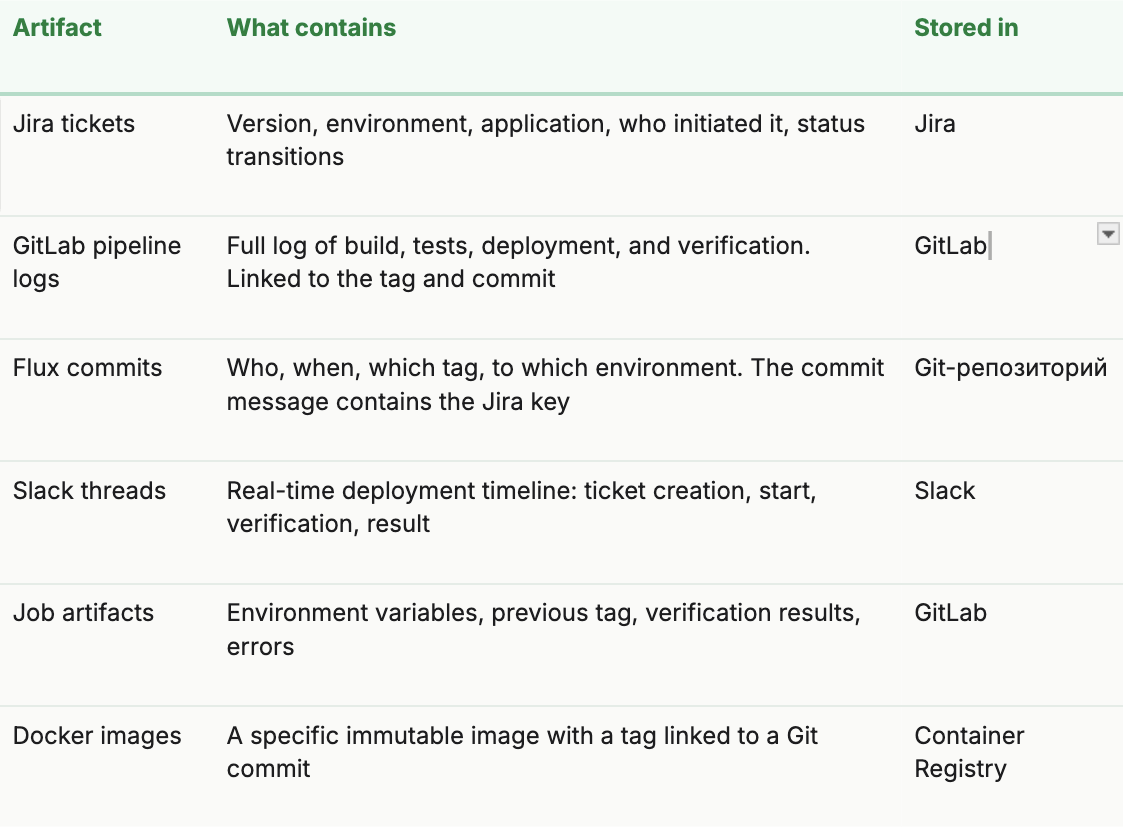
Retention (Data Retention Periods)
Why does retention matter? An auditor might show up six months later and ask for the full history of changes over the past quarters. If by that time the GitLab job artifacts have already expired, the Docker image has been removed by the cleanup policy, and the Slack thread has been archived, reconstructing the chain of “who → when → what → with what result” becomes impossible.
Without proper retention, a compliance strategy has holes: artifacts exist while they’re fresh — and disappear exactly when they’re needed most.
That’s why we configure retention policies by artifact type:
- Jira and Git — effectively permanent storage (for as long as the system exists).
- GitLab job artefacts — limited retention period; for compliance-critical data, extended retention or export must be configured.
- Docker images — cleanup policies must account for the fact that production images may be required for audits or rollback.
Artefacts are connected in a chain: from the Jira ticket to the pipeline, from the pipeline to the Flux commit, and from the commit to the tag and the image. This end-to-end traceability — from decision to result, without gaps — is exactly what an auditor needs.
Results
It’s hard to provide precise “before/after” numbers—we didn’t time every deployment. But here’s what changed noticeably:
- We deploy when needed, not when a “window” opens. For most environments, deployments are no longer tied to a specific day. Less code accumulates between releases — fewer “time bombs” inside each deployment.
- When an auditor shows up — we’re ready. There’s no need to gather information in a rush. One query in Jira — and the full quarterly history is there. This genuinely saved us hours of audit preparation.
- Engineers focus on engineering. They no longer fill out tickets manually, post “deploying to prod” in Slack, or check by hand whether everything rolled out successfully. It’s minutes saved per deployment — but with 7 environments, those minutes add up to hours.
- “What’s running in prod?” That question no longer appears in chat. Jira, the Slack thread, GitLab — everything is visible at any moment. Chat is no longer the source of truth, and honestly, that’s one of the most satisfying changes.
- 30+ services on a single template. Improve the template in one place — and it propagates to all projects. No need to visit 30 repositories to fix the same issue over and over.
What This Does NOT Solve
It would be dishonest to say “we automated everything” and leave it at that. Here’s where open questions still remain for us:
- Verify is not testing. We check that the application starts and responds. Whether the business logic works correctly is a different matter. We are already implementing automated smoke tests to close this gap (more on that in the next section).
- A unified template is great — but specifics exist. The template is parameterised and covers the vast majority of scenarios. However, some services have unique aspects — non-standard health paths, cascading dependencies, environment-specific logic — and require additional configuration. That’s expected.
- External dependencies. If Jira is down, a ticket won’t be created. If Slack is down, notifications won’t be sent. The deployment continues in “Flux-only” mode, but part of the automation degrades.
In Short: What We Learned
- The main value is predictability, not speed.Yes, deployments became faster. But what truly matters is that they are consistent every single time. No more “we do it slightly differently in this environment.”
- Auditors appreciate automation.“We always do it this way — here are the artefacts” is much stronger than “we try not to forget.” An automated process proves itself.
- The template pays off.The first service took a long time to integrate. The second was faster. The thirtieth took just a couple of lines in the config. Investment in a solid template compounds over time.
- GitOps is an approach, not a religion.Take the principles (Git as the source of truth, declarative configuration) and adapt them. “Pure GitOps” doesn’t survive in a regulated environment — but a GitOps-based approach absolutely does.
- Honesty about limitations builds trust.We don’t say “everything is automated.” We say, “This is what’s automated, this is what isn’t, and this is where we’re heading next.” And that works better.
Final Thoughts
We started from a place where every deployment was an event: it happened on a specific day, specific people were responsible for it, they created manual tickets, and everyone hoped nothing would break. Now we’ve reached a point where deployment has become routine. A developer simply clicks a button, the system does the rest, and the auditor is satisfied.
There’s no magic involved — we simply connected familiar tools (GitLab CI, Flux, Jira API, Slack) into a single workflow and gradually validated it, adjusting the process along the way to fit both the product’s needs and regulatory requirements. Step by step, service by service, we built an automated flow and made it much easier to track and retain the necessary data across 30+ services.
If you’re dealing with a similar situation — a CRM or another business-critical system with regulatory requirements and manual processes — we hope our experience shows that it’s solvable. Not instantly, not perfectly, but absolutely realistically.
Thanks for reading!
This article is based on real experience. System names, domains, and internal project details have been changed or generalised. All numbers represent an approximate scale.
本文提供給您僅供資訊參考之用,不應被視為認購或銷售此處提及任何投資或相關服務的優惠招攬或遊說。金融商品交易涉及重大損失風險,可能不適合所有投資者。過往績效不代表未來表現。
 回到所有部落格文章


相關文章
- How to Introduce AI into an IT Team: the EXANTE Stories
 2025年12月22日
 - How We Made Python Pytest Suites 8.5× Faster
 2025年12月2日
 - Micro Frontends: A Developer Fad or a Real Business Benefit?
 2025年10月30日
 - Quitting the Samurai Path: How EXANTE Is Changing Its Infrastructure, or How We Failed at Going Cloud Native
 2025年10月15日
由專業人士建立。為專業人士打造。
