

How to Introduce AI into an IT Team: the EXANTE Stories

My name is Alina, and I’m the IT Director, Web Interfaces at EXANTE. I’m responsible for project delivery and technical development.
For more than a year, we’ve been gradually integrating AI into our workflows – no major overhauls, just steady, incremental steps.
During this time, we’ve reduced routine managerial tasks, accelerated code reviews, improved understanding of affected modules during development, and sped up project prototyping.
Who Is This For (and Why)
This article is for IT managers and IT directors. It outlines practical steps to bring AI into delivery processes, accelerate prototyping (MVP/POC/R&D), reduce manual overhead in reviews and status tracking – all while maintaining control and transparency.
This article explores real AI use cases across engineering, QA, management, and business. Don’t expect any radical changes, just small, incremental wins drawn from real EXANTE projects.
AI for Engineering
Story 1: Prototypes and IDE Agents – the First Step
Situation
Our teams often needed quick MVPs, POCs, and R&D prototypes to validate ideas. Early in the year, AI developer tools had reached maturity. Since stable IDE agents with reliable feedback became available, we decided to explore how they could speed up delivery.
Goal
To test AI assistants on prototyping, migration, and routine development tasks.
Action
We started with the basics: IDE AI assistants. A few enthusiasts compared available tools. We initially tested Windsurf, then switching to Cursor.
We bought corporate licenses, ran short onboarding sessions, and prepared internal guidelines.
The key principle was optional adoption. No pressure. Use remained voluntary.
Developers gradually embraced the tools. They learned how to feed contextual files, tune indexing, and use Cursor Rules.
Initial feedback was sceptical (“It doesn’t understand what I want”), but once people learned how to provide the right context, everything changed.
According to our internal survey, about half of respondents now say that AI tools save them up to 5 hours per week, while around 20% report saving more than 5 hours weekly on a range of tasks.
Our team primarily uses Claude Code in JetBrains (via corporate licenses) to improve delivery speed and engineering efficiency. AI assistance now supports developers in several key areas:
- Rapid PoC creation and early validation of technical approaches
- Faster navigation and comprehension of unfamiliar modules and dependencies
- Tooling modernization, such as migrating Django tests to pytest and upgrading Storybook v6 → v7
- Library and framework migrations, including moving from jQuery → React and converting JavaScript to TypeScript
- Automation improvements, like generating helpful CI/CD configuration snippets
As a result, onboarding becomes faster, refactoring costs decrease, and new features reach production sooner.
Claude Code (in short)
- Claude Code – a CLI-based coding agent (reads files, executes commands, commits changes).
- Project memory (CLAUDE.md) stores architecture and team conventions.
- Follows the Unix philosophy, making it easy to automate in CI with a single command.
We tested several solutions and deliberately chose Claude Code. It handles long project contexts more efficiently, reasons more accurately during migrations and refactors, and makes fewer structural mistakes.
The team finds it especially convenient within JetBrains.
Occasionally, fixing AI-generated code takes longer than writing it from scratch – that’s fine. The tool still removes the “blank page” barrier and speeds up scaffolding.
Result
Less boilerplate, faster prototypes and tests.
⭐ Insight: optional rollout and context training were key to success. Adoption happened naturally once people understood how to use it effectively.
Story 2: AI Code Review – Automated Reviewer
Situation
Code review takes a significant amount of time. With large changes, a human reviewer can miss small but important issues. We wanted a “second reviewer” – an automated quality check that runs before the code reaches a colleague.
Goal
To use AI to quickly detect critical bugs and security issues when a Merge Request is created – or even earlier, during local development.
Action
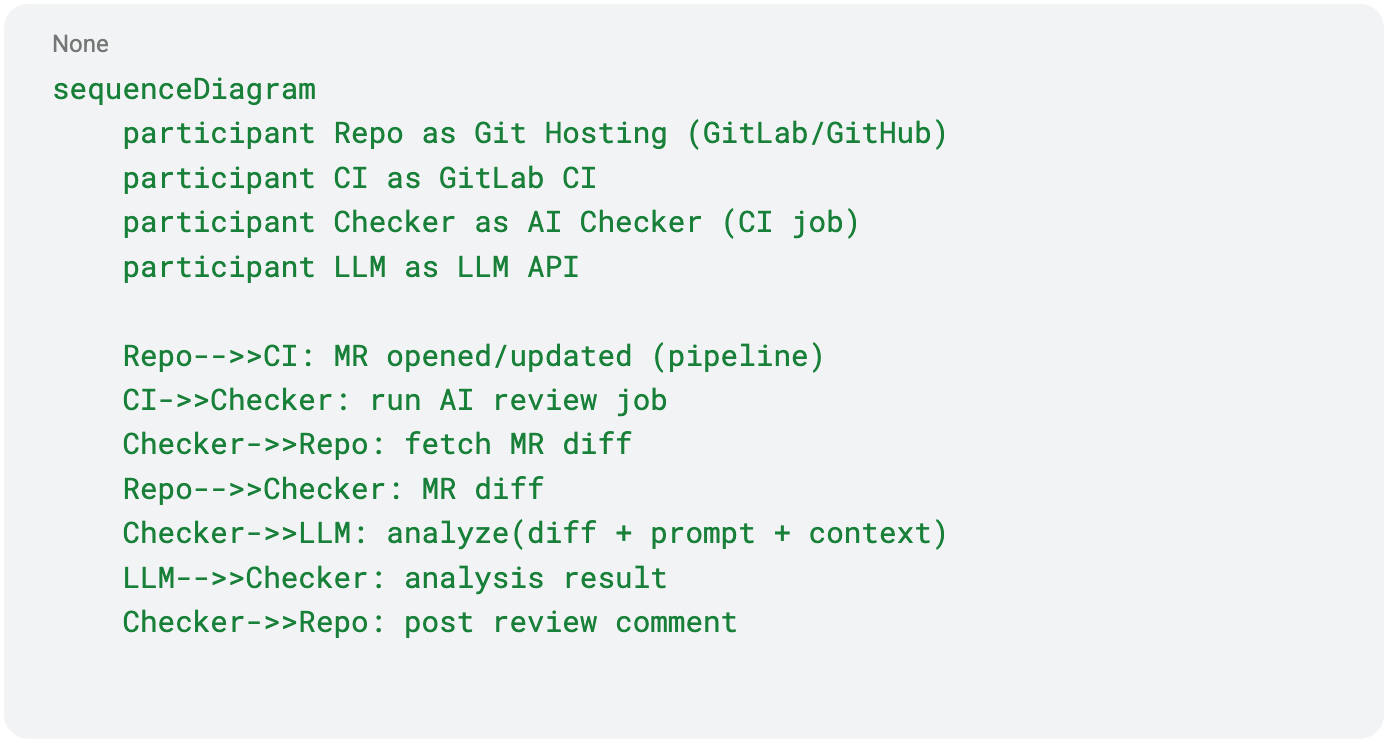
We developed a Node.js-based script for automatic AI-driven code review, which works in two modes:
-
Locally – pre-commit
- the developer runs AI checks before pushing changes
- receives instant feedback in the terminal
- Issues can be fixed before they reach the MR
-
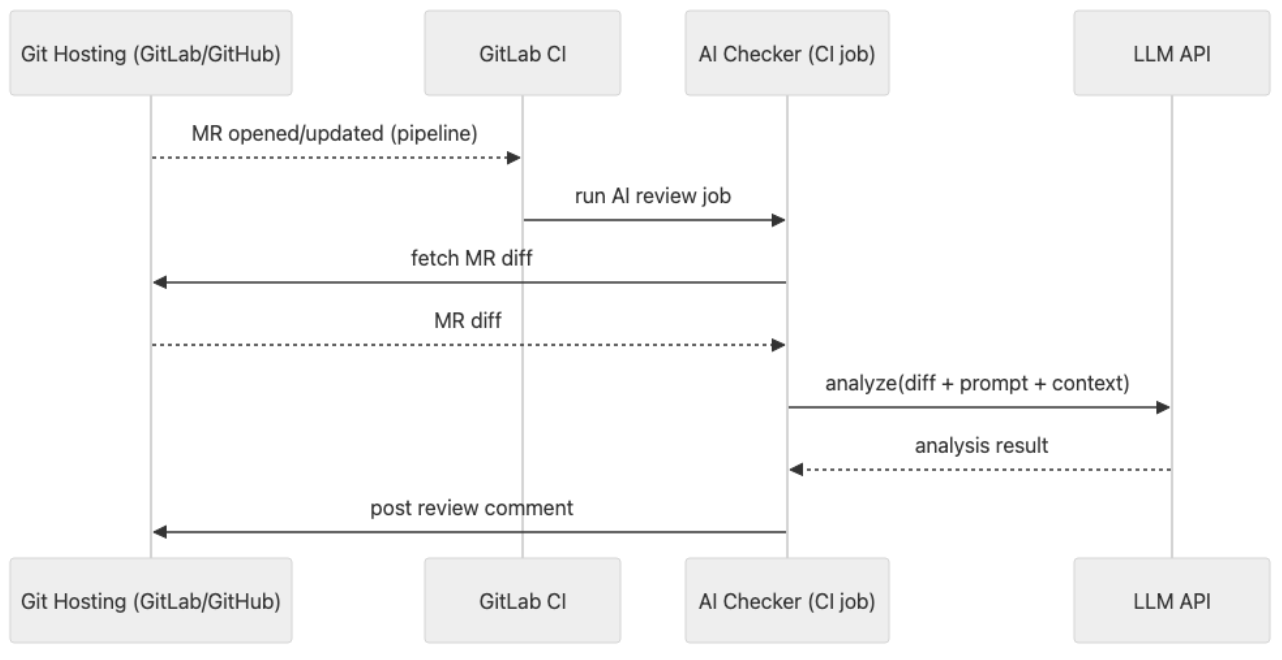
CI – automatically on each Merge Request
- the pipeline extracts the diff of modified files
- loads additional local context if needed
- sends diff + context to the AI model via API
- stores the result in reviews.json
- the gitlab_review.js bot posts inline comments directly in the GitLab MR
This way:
- most issues are caught before a human reviewer is involved
- automation reduces the workload for the team
Prompt Example
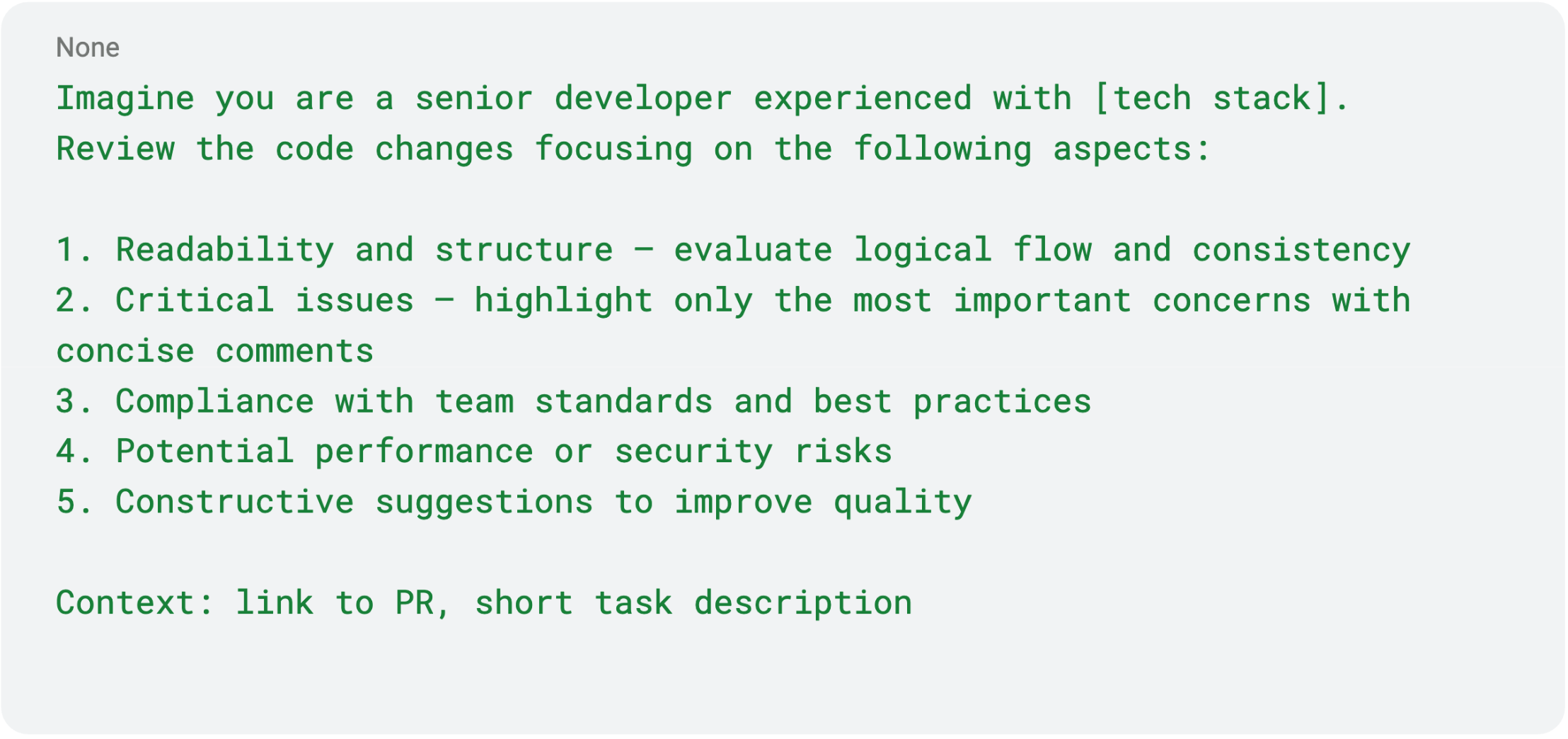
The result appears in the local console or posted as CI comments.
Initially, this was introduced as an optional experimental job.
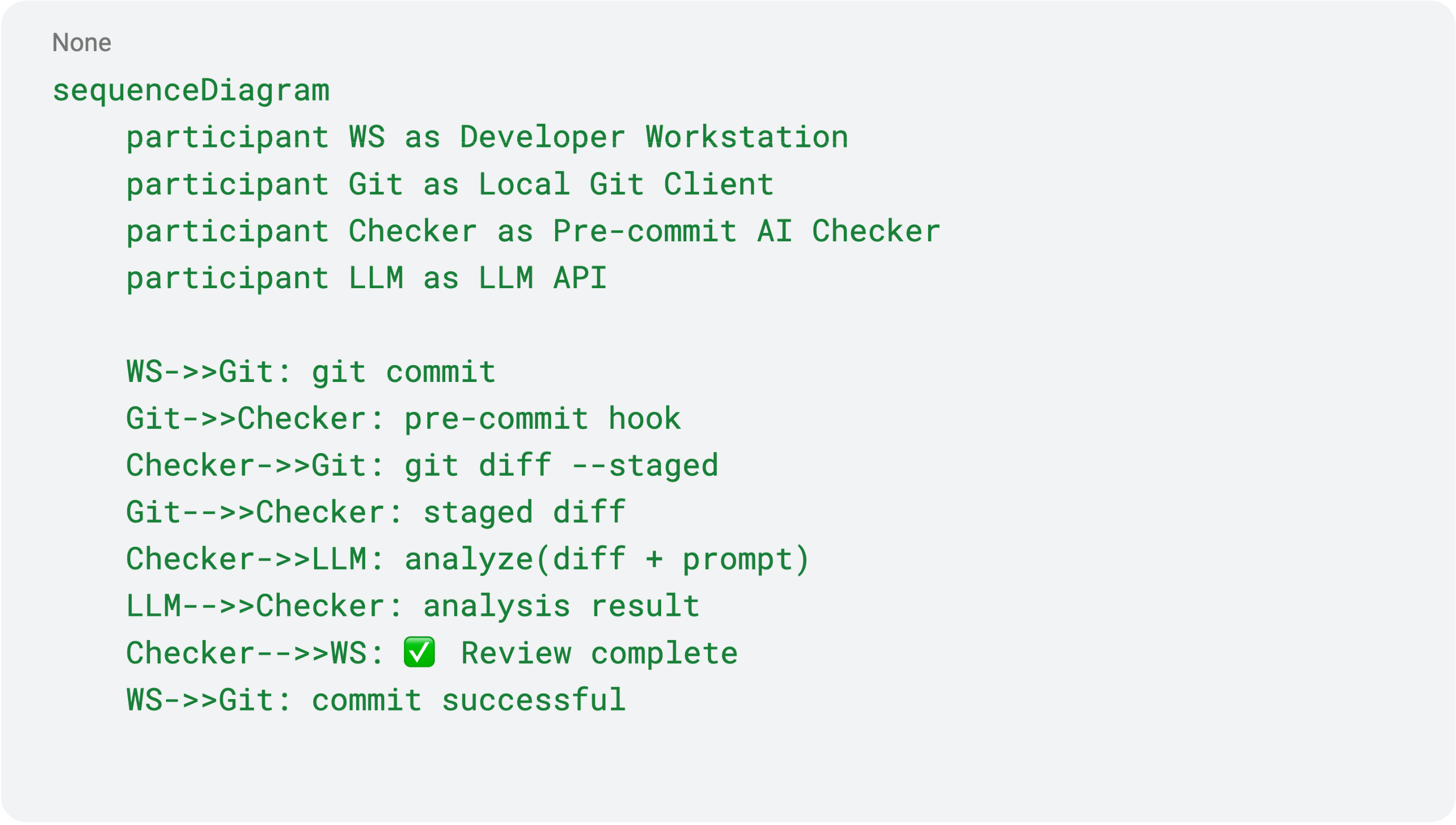
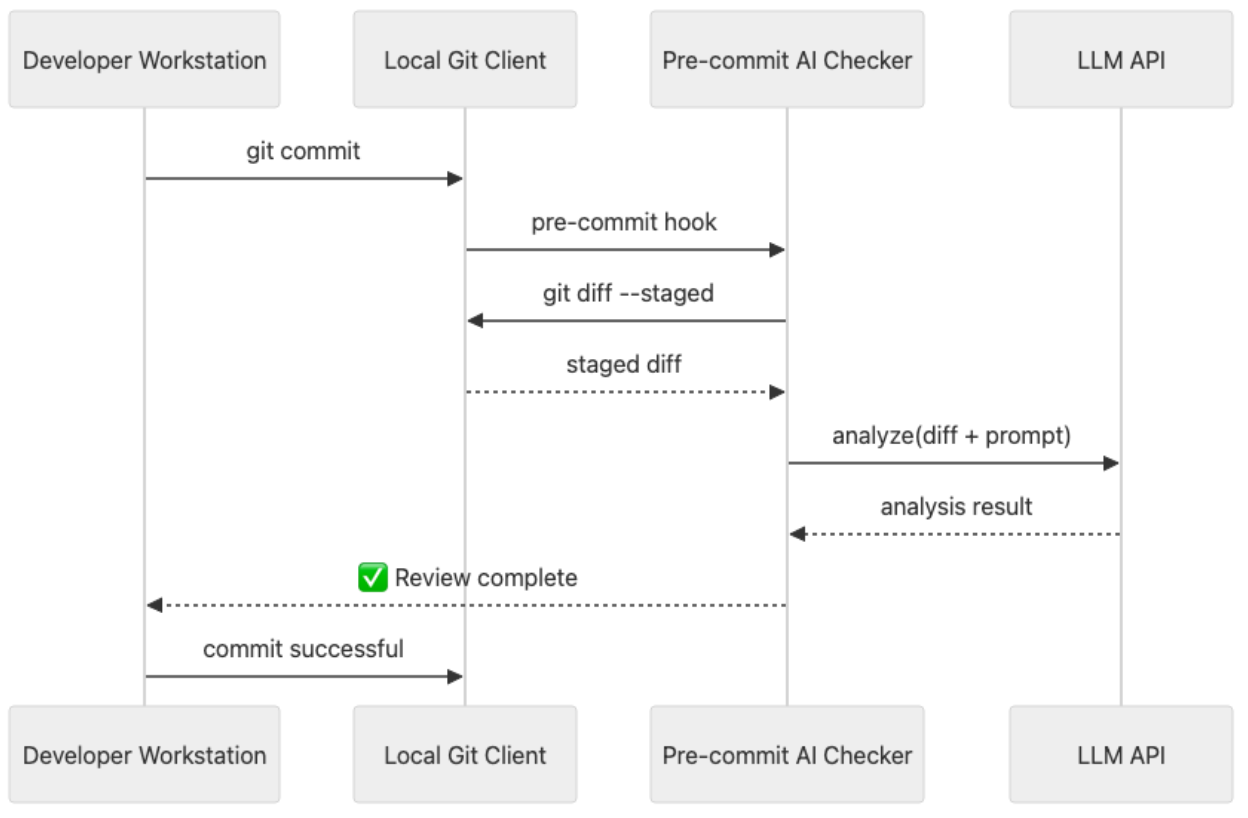
After several successful iterations, usage expanded across multiple teams. How It Works (sequence diagram)
Local pre-commit (happy path):
GitLab CI:
Current Status & Limitations
We are actively testing this approach across several projects.
It performs well on small diffs and helps reduce trivial review comments.
However, there is an important limitation – the AI analyzes only the diff, without the full project context. As a result, the AI may miss cross-file relationships and occasionally provide superficial recommendations.
Next Step
Expand the analysis toward context-aware AI review:
- understand module-to-module interactions
- verify API contract compatibility
- track architectural constraints and assumptions
The goal is to build an automated reviewer that understands the entire project,
not just the diff.
Result
AI review provides fast and helpful feedback while reducing the load on human reviewers.
Engineers remain fully in control, and the AI works as a secondary reviewer that points to potential risks early.
⭐ Insight: Diff analysis is a great start, but without the architectural context, recommendations may remain shallow.
The next step is expanding toward context-aware AI review using Claude Code in CI.
AI for QA
Story 3: Affected Modules – Helping QA
Situation
To properly test changes, the QA team needs to understand:
- which parts of the system are potentially affected,
- where hidden regressions may occur,
- what should be tested beyond the main task functionality.
In practice, this information is often incomplete or entirely missing from developers. As a result, QA either spends too much time identifying areas of risk or misses critical issues.
Goal
Automate the identification of affected modules and regression risks, so that:
- for each MR, QA knows exactly what should be tested,
- before release, there is a complete list of modules that require regression testing.
Action
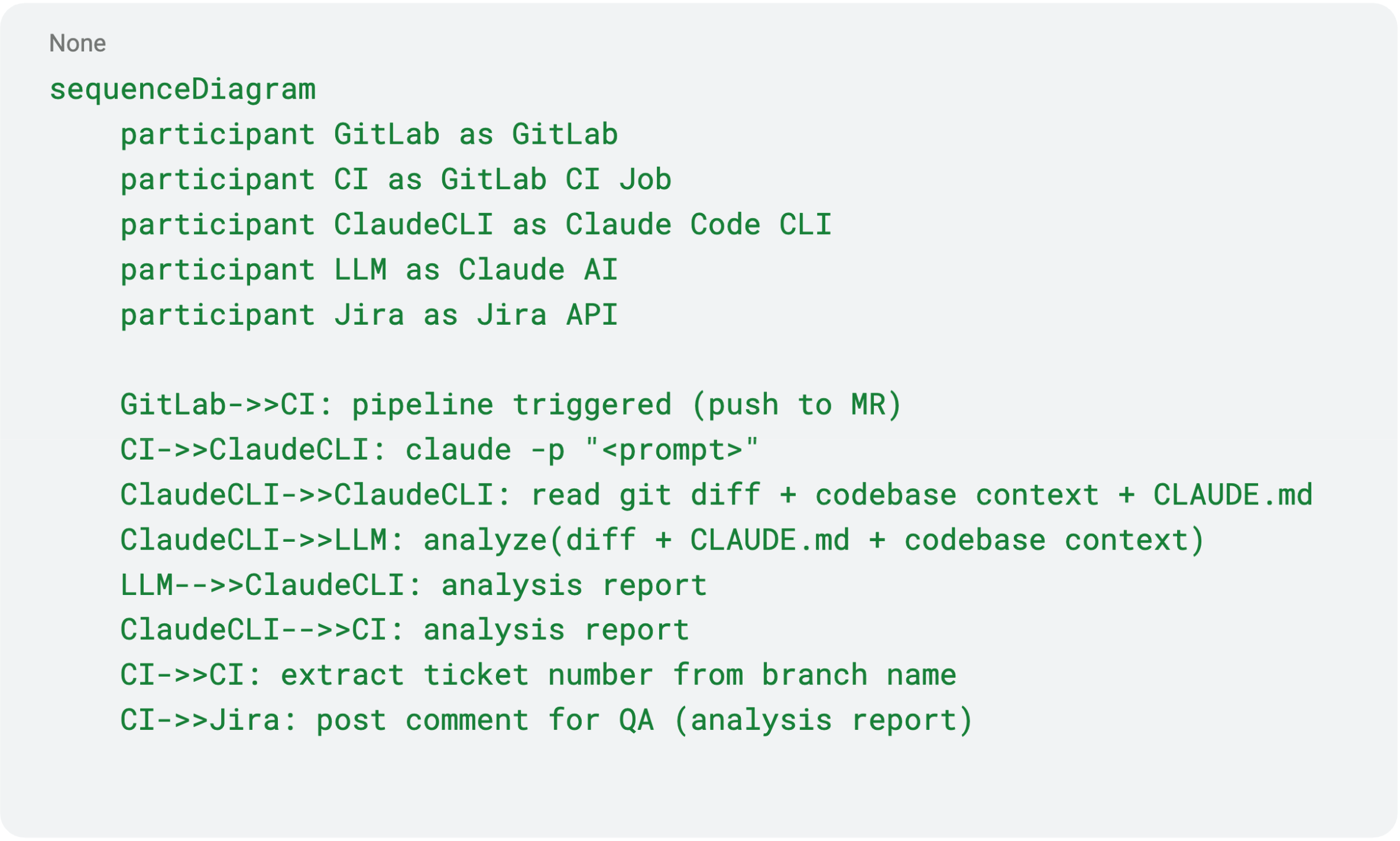
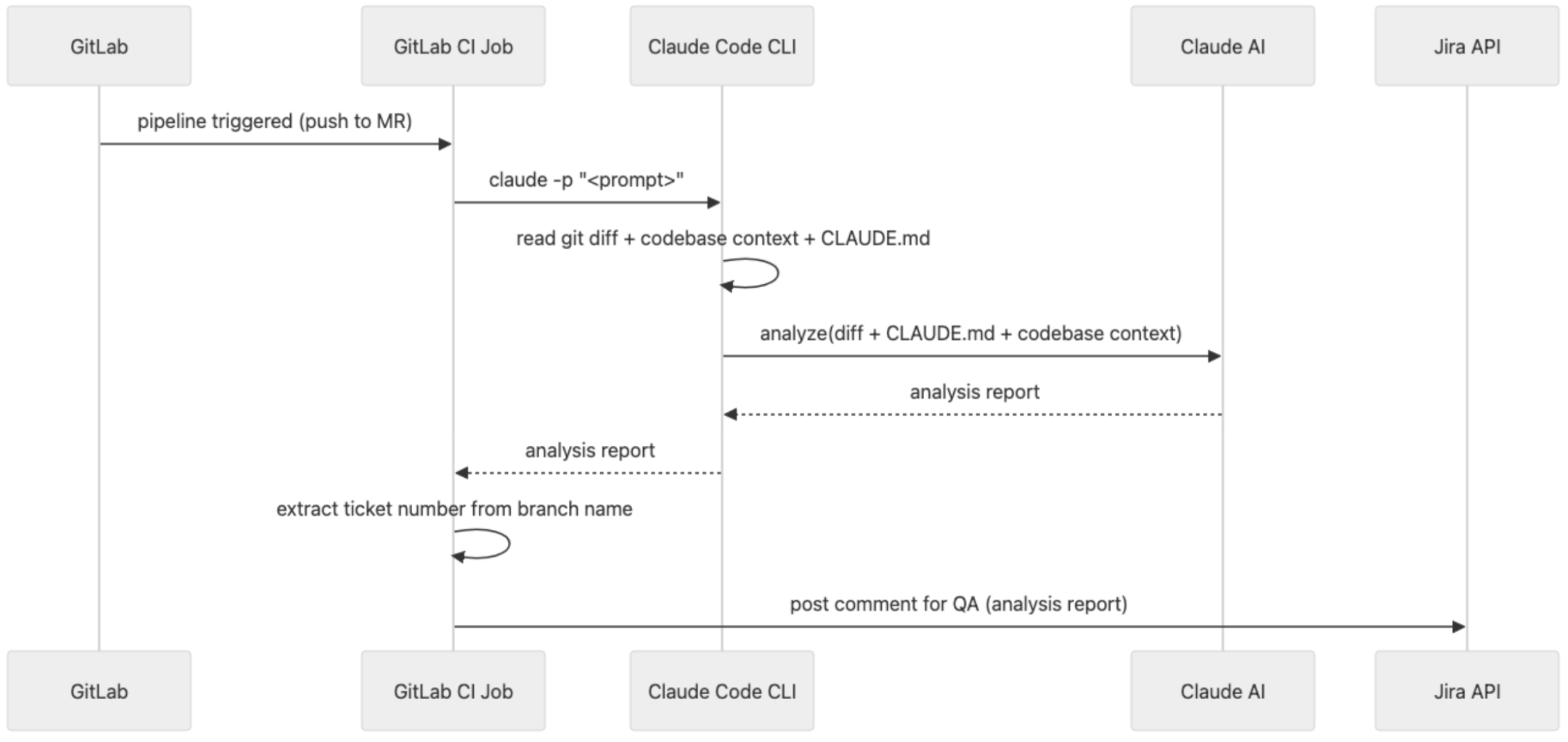
We integrated this process into GitLab CI:
- the pipeline runs on every Merge Request,
- extracts the diff of modified files + repository context,
- sends the data to the AI model (Claude Code CLI),
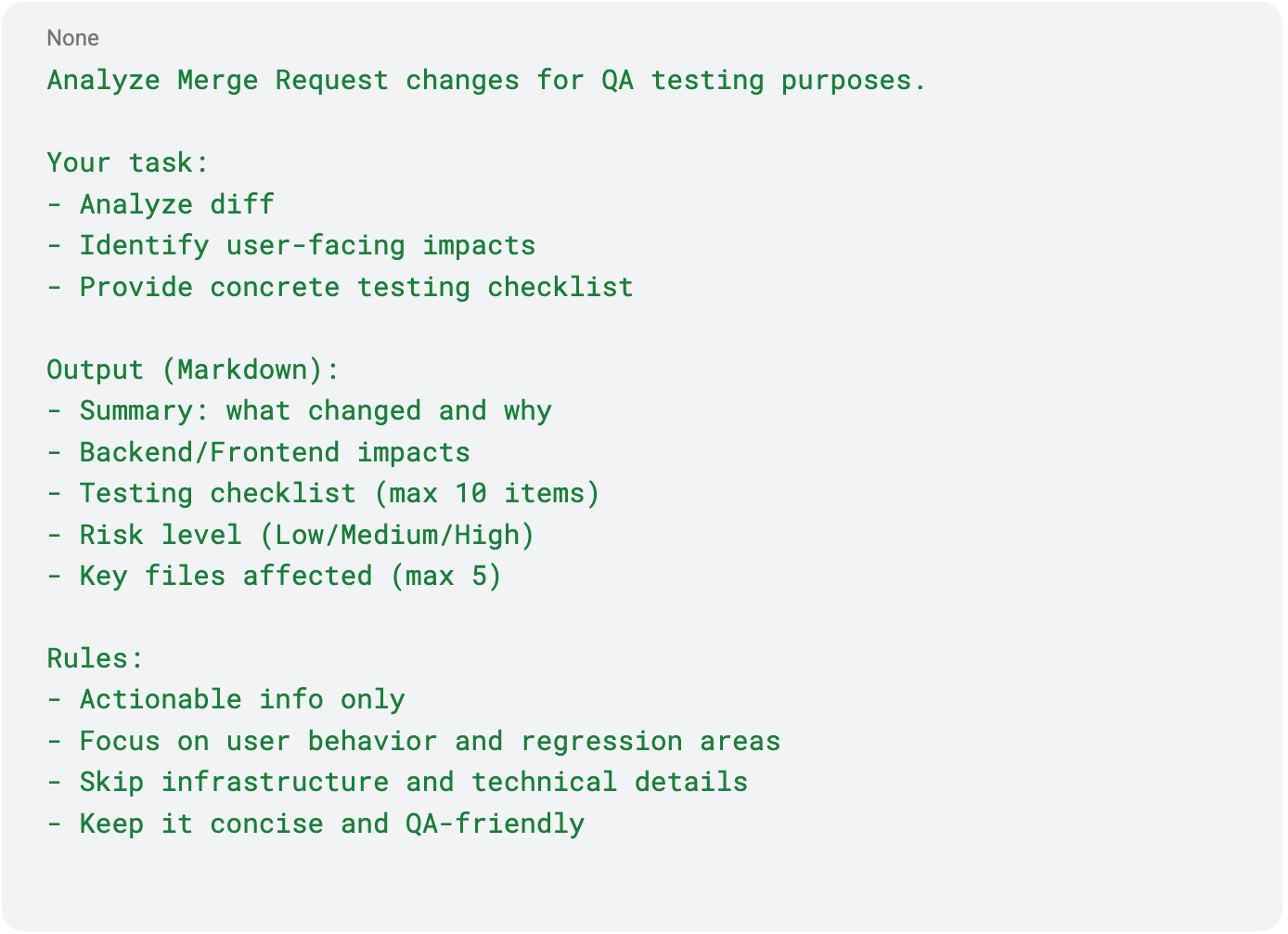
- AI generates a structured Markdown report for QA.
Where we publish the results
- Per MR The report is automatically added as a comment to the related Jira ticket:
- what changed,
- risk areas,
- what needs to be tested.
- For the entire release Reports are aggregated into a single list of impacted modules, which is then used for final regression testing before production deployment.
Example of the actual prompt used
How It Works (sequence diagram)
Result
- QA immediately knows what to test for each task
- Fewer missed regressions
- Reduced communication overhead (“what else did we break?”)
- Improved release quality and faster testing cycles
AI for Management
Story 4: Meetings & Traffic Lights – Automating Status Updates
Situation
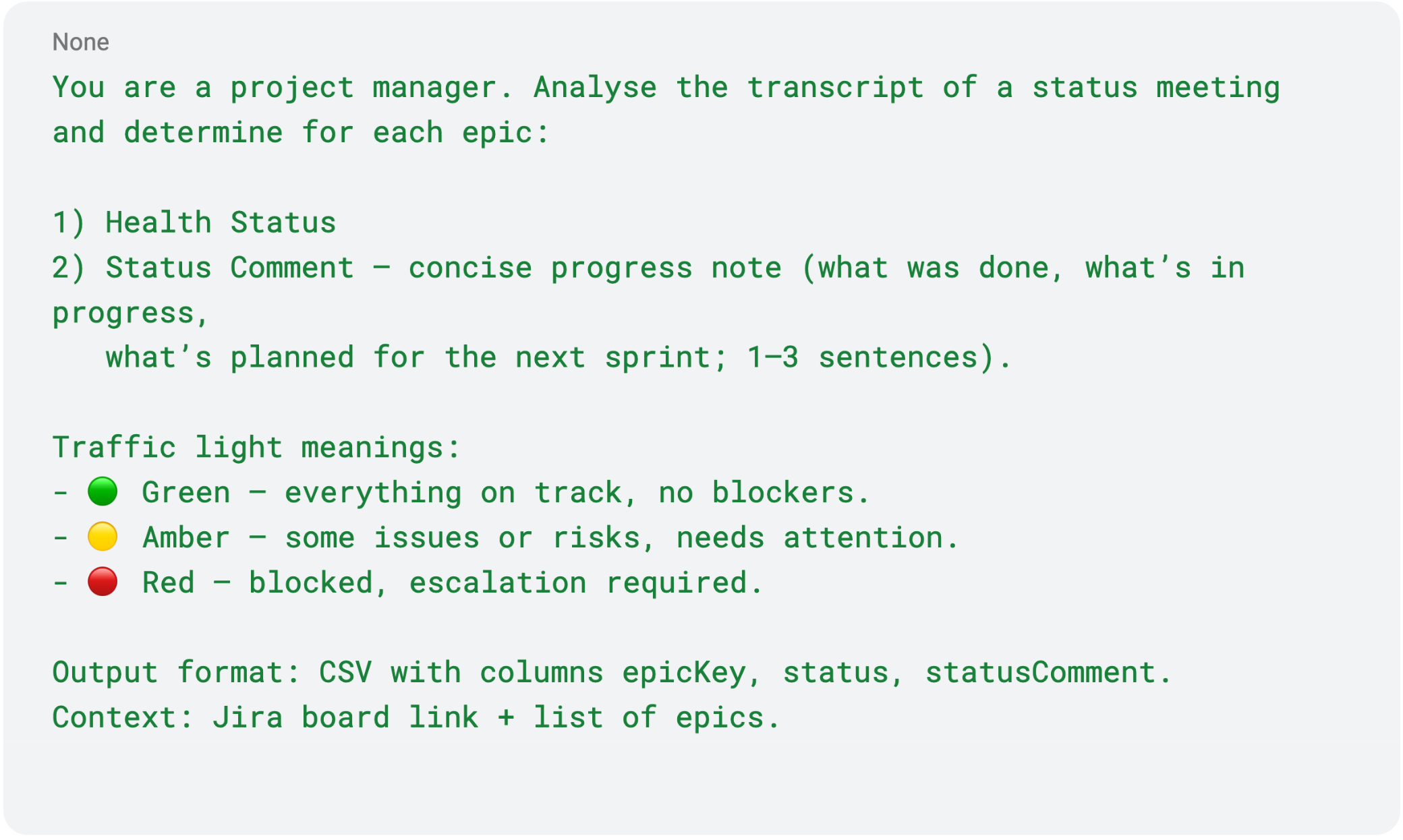
A corporate requirement appeared: to regularly update Health Status (traffic light) and Status Comment for every epic and initiative in Jira. Each entry has to include a colour and a short but meaningful progress note that explains what’s done, what is ongoing, and what’s next.
- 🟢 Green – on track
- 🟡 Amber – risks or delays
- 🔴 Red – blocked
Previously, teams updated these fields manually, even though the same information was already discussed during weekly syncs.
We decided to automate this process using meeting recordings.
Goal
Automate the collection and updating of Health Status and Status Comments after meetings, so stakeholders can track progress without extra syncs.
Prompt Example
Action
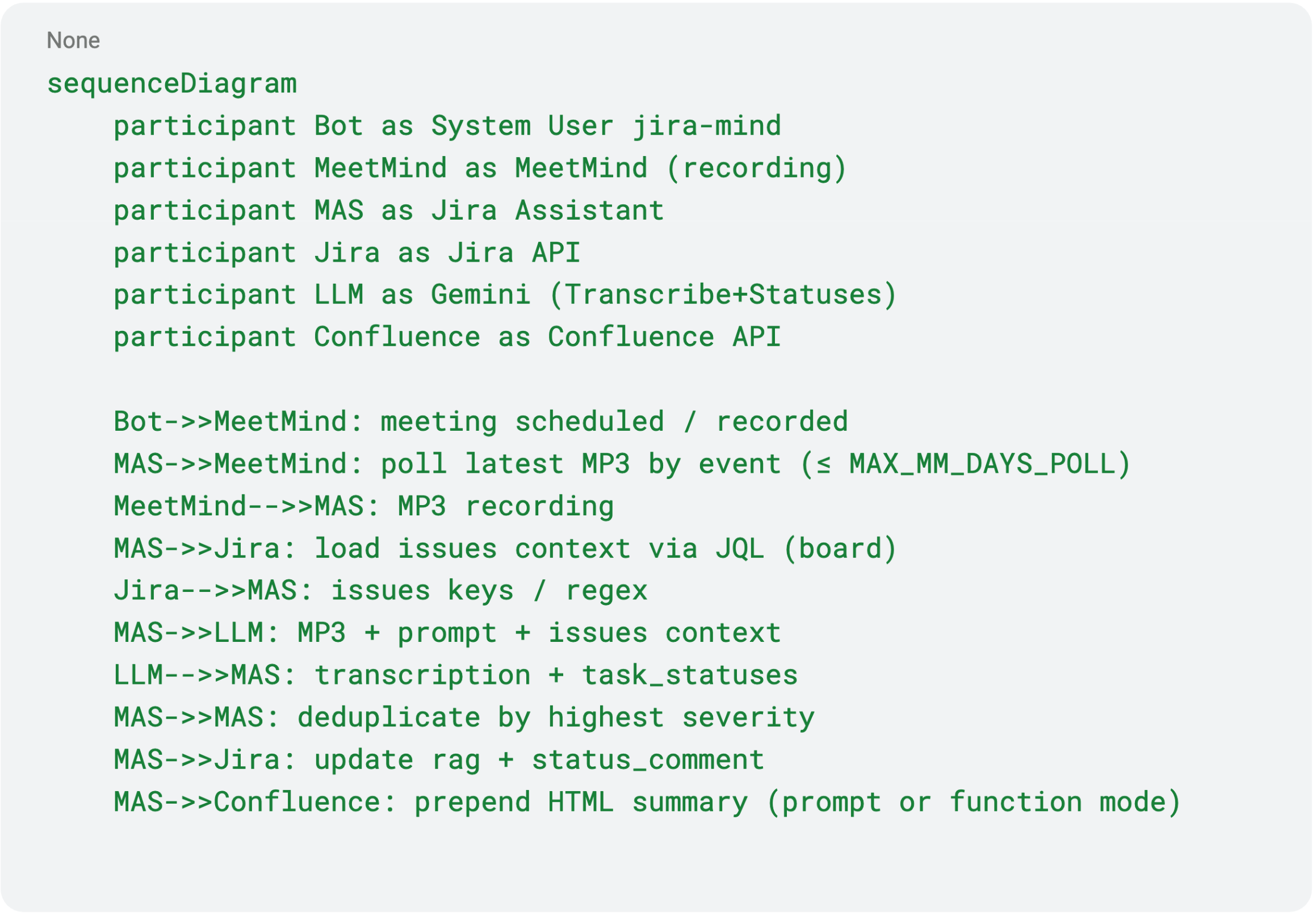
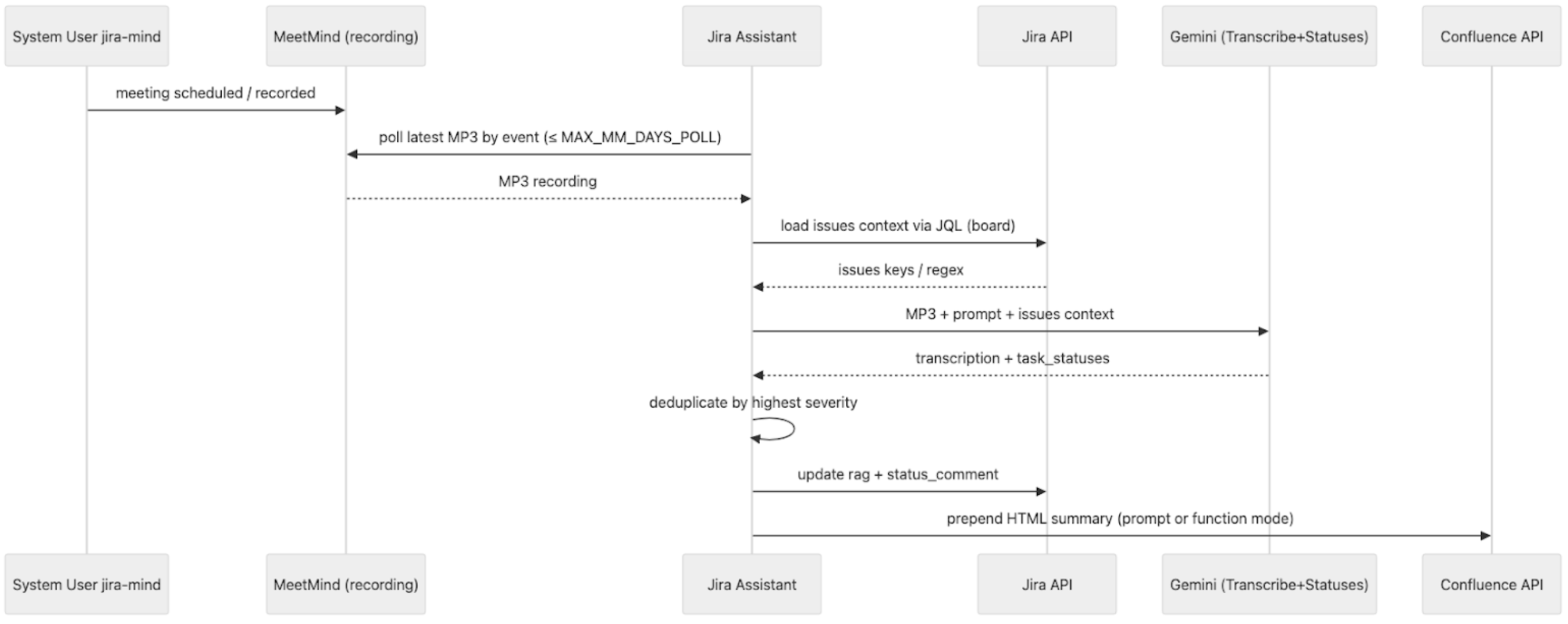
We record Google Meet sessions and automatically transcribe the audio using our internal MidMind speech-to-text service. Although it’s technically possible to integrate with off-the-shelf solutions like Google Cloud Speech-to-Text or Whisper API, our production workflow relies on our own system.
The resulting transcript is then passed to an AI model together with the list of epics from Jira (via Jira API) and a link to the relevant board.
The model returns:
- Health Status
- Status Comment – progress summary
We then update the Jira fields rag and status_comment via API.
If the meeting was not in English, the comment is automatically translated.
💬 As a result, clients and internal stakeholders can now track live progress directly in Jira without waiting for weekly syncs.This has reduced the number of meetings and follow-up requests.
Rules for Status Mapping
- Extract task mentions and progress from transcripts.
- If multiple mentions exist, pick the most critical one.
- RAG mapping:
- 🟢 Green: incoming, doing, ready for review, testing, released
- 🟡 Amber: scope changed, delays, lack of sign-off, team overloaded
- 🔴 Red: blocked
- Generate a connected Status Comment explaining what was done, what’s next.
How It Works (sequence diagram)
Result
Managers no longer waste time writing manual status reports.
After each meeting, Jira updates automatically, and clients can see progress notes right away.
All meeting summaries with statuses are also automatically collected into a Confluence page, so managers can save time without having to attend every meeting, and they can simply review the consolidated updates.
Less “What’s the status?” – more “I see what’s done and what’s next.”
AI for Business
Story 5: EXANTE Pulse – AI for Trading News
Situation
Traders manage dozens of instruments simultaneously.
Financial news break every minute, and manually matching relevant updates with specific instruments is nearly impossible.
Missing one headline can result in missing profit – or an unexpected loss.
Goal
Build a system that automatically gathers, analyses, and links news to traded instruments, showing relevant updates directly in the trading terminal.
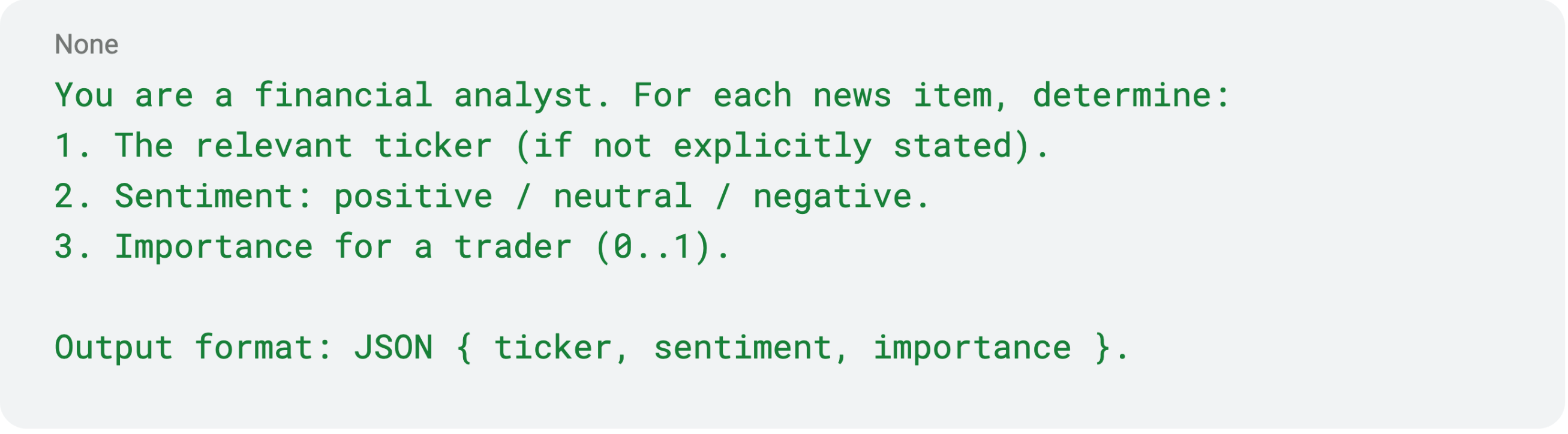
Prompt Example
Action
We built EXANTE Pulse – an AI-powered system for real-time news aggregation and analysis.
Architecture:
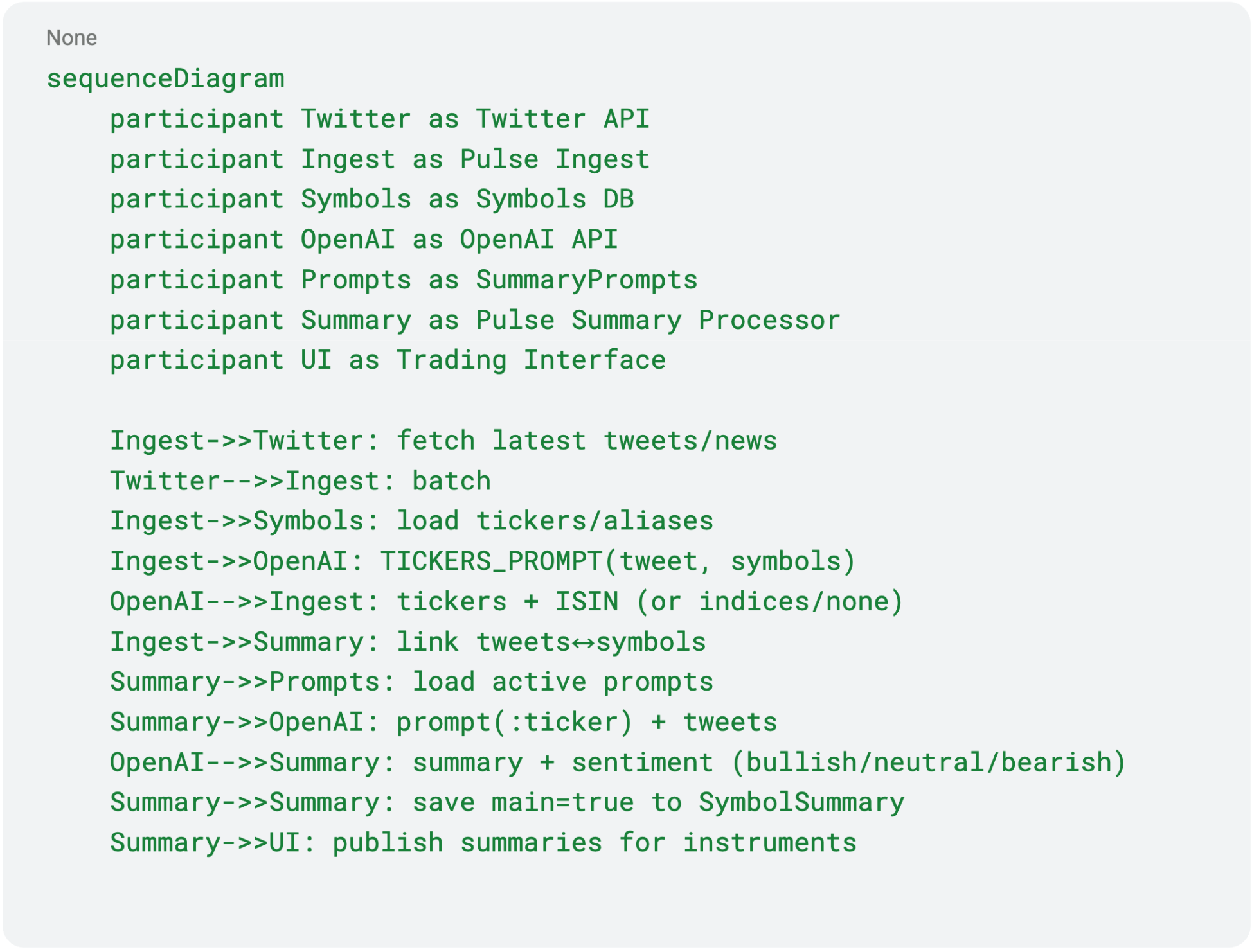
- Twitter API → collects latest financial updates from verified sources
- News Analytics Service → processes the news stream
- Symbol Database → stores tradeable instruments (tickers, ISINs, names)
- OpenAI API → analyses each news item:
- Extracts tickers and ISINs
- Determines sentiment (positive/neutral/negative) and relevance
- Trading Interface → displays key news on user profile
How It Works (sequence diagram)
Result
We created a client-facing AI product.
Traders now see contextual financial news directly within EXANTE’s trading interface, without needing to switc between tabs.
⭐ Insight: weighting news importance based on user trading activity significantly increases relevance and reduces information noise.
Additional Tools
Alongside the main stories, several smaller tools helped too:
- Voice Decoder (Wispr Flow): developers dictate prompts to AI agents by voice, enabling faster interaction.
- AI-ready Code Context: repositories are structured (by modules and dependencies), helping AI assistants to understand the project architecture.
Privacy & Control
- Data is stored in EXANTE’s private cloud.
- Access is role-based and fully auditable.
- Policy: opt-in AI usage and transparent notifications.
What I’ve Learned Over the Year
- Start small. IDE agents and scripts deliver quick wins.
- AI is an amplifier, not a replacement. It reduces routine tasks, but decisions remain human.
- Find early adopters. They’ll help others adopt without pressure.
- Build MVPs and iterate. Working prototypes beat perfection.
What’s Next
- Integrate the Figma Claude Code package to streamline layout prototyping by pulling designs directly into the development workflow,
- Finalise the internal “Code Context” package for AI Code Review,
- Evolve EXANTE Pulse (news weighting & personalisation),
- Expand AI coverage across other delivery stages.
Where You Can Start
If you’re an IT manager exploring AI adoption:
- Start with IDE agents (Cursor + Claude), who ensure low barriers and instant results.
- Add a simple pre-commit AI checker for code review.
- Automate one routine process (statuses, meetings, or affected modules).
- Measure results, gather feedback, iterate.
The key principle: AI is a tool, not a goal. Use it where it truly helps.
本文提供給您僅供資訊參考之用,不應被視為認購或銷售此處提及任何投資或相關服務的優惠招攬或遊說。金融商品交易涉及重大損失風險,可能不適合所有投資者。過往績效不代表未來表現。


相關文章
- CRM, Regulatory Constraints, and Automation: How We Engineered a Reliable Release Process
 2026年3月4日
 - How We Made Python Pytest Suites 8.5× Faster
 2025年12月2日
 - Micro Frontends: A Developer Fad or a Real Business Benefit?
 2025年10月30日
 - Quitting the Samurai Path: How EXANTE Is Changing Its Infrastructure, or How We Failed at Going Cloud Native
 2025年10月15日
由專業人士建立。為專業人士打造。
